Independent public comparison
We asked Trainline and National Rail to find a standard-class single from London Euston to Manchester Piccadilly after 09:30 on Tuesday 20 October 2026. We compared one adult with no Railcard and stopped before retailer handoff, identity or payment. We are not affiliated with either service. This records the public journeys on 26 September 2026; fares and timetables can change.
The London-to-Manchester rail test
Find and compare a one-way fare after 09:30, then understand the ticket conditions and total before leaving the service.
London Euston to Manchester Piccadilly.
Tuesday 20 October 2026, departing after 09:30.
One adult, standard class, no Railcard and no account.
At Trainline’s ticket summary and National Rail’s retailer chooser. No identity, retailer handoff, reservation or payment was submitted.
UK English and GBP in a public Chrome session on desktop, followed by phone-width review where the loaded page allowed it.
The 30-second result
National Rail kept the chosen train, fare conditions and retailer handoff under the customer’s control.
National Rail wins this journey. Both services exposed the same useful price range, from £14 slower connecting trains to £43.50 direct trains around 10:13 and 10:33. National Rail preserved the selected 10:13 direct service and showed £43.50 Advance, £79.80 Off-Peak and £193 Anytime choices. Trainline’s recommendation changed to the 10:46 £14 itinerary after we selected a £43.50 result, then showed a £14.79 total. National Rail was slower in field data, but clearer at the commitment boundary.
Both exposed the trade-off between direct speed and a cheaper connection
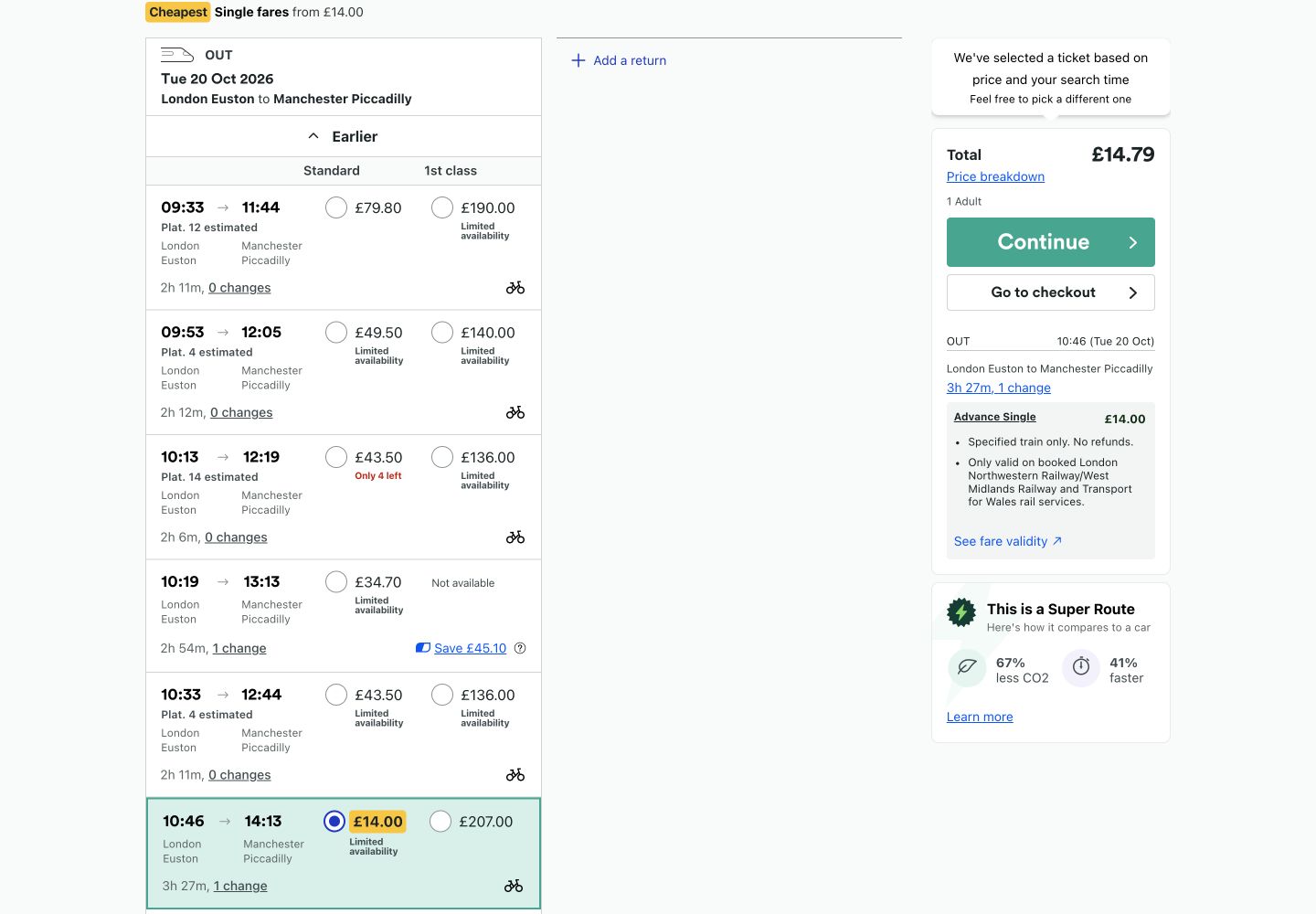
Trainline showed a 09:33 direct train at £79.80, 09:53 at £49.50, 10:13 and 10:33 direct services at £43.50, and a 10:46 one-change service at £14. The 10:13 trip was the fastest visible journey at two hours six minutes. National Rail returned the same key price points, including a £14 connecting option at 09:46 and the £43.50 10:13 direct train.
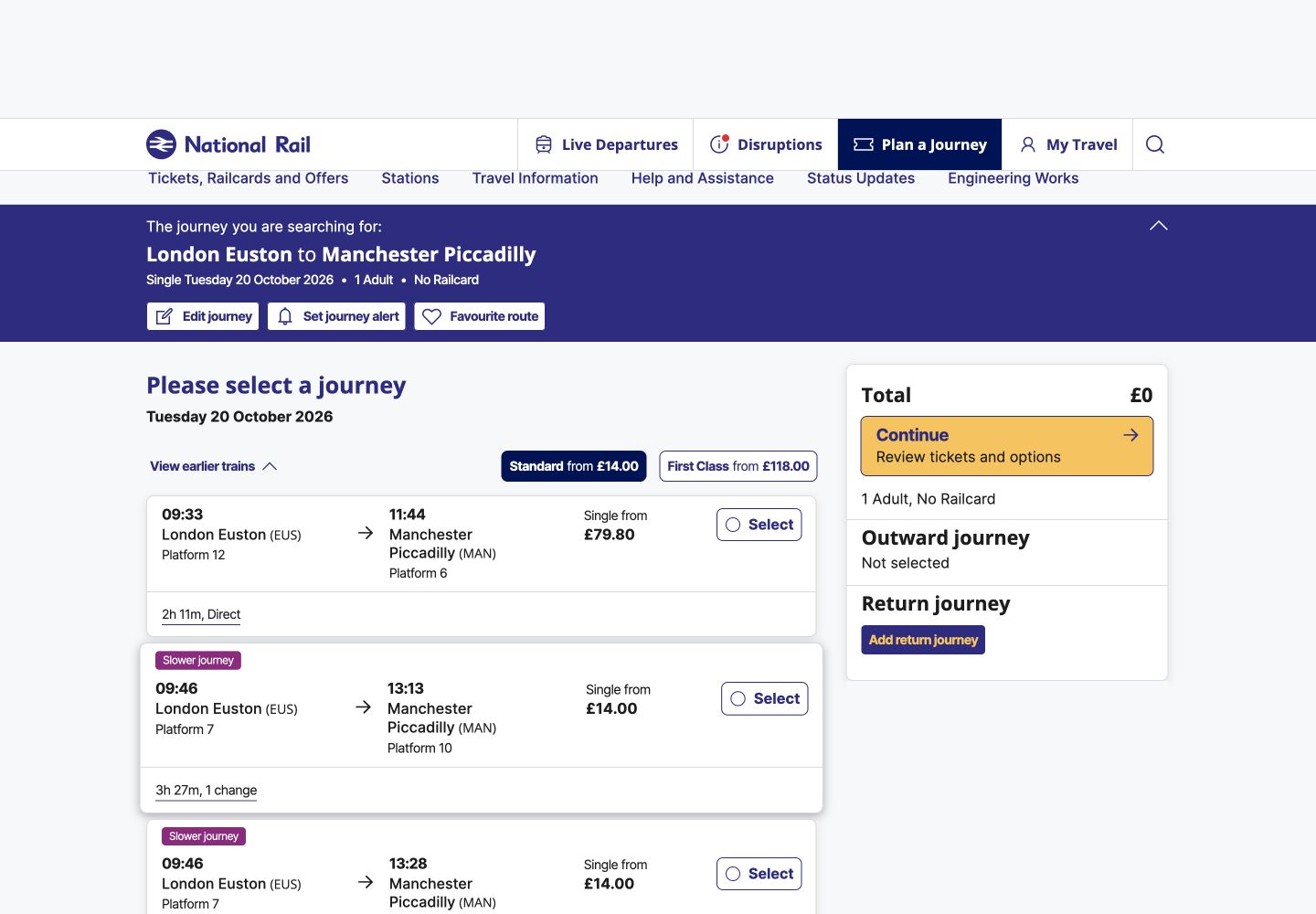
National Rail’s result labels such as “fastest” helped interpret a dense timetable. Trainline’s vertically stacked cards were visually lighter. Both allowed a customer to trade money against time without opening every service.
National Rail preserved the selected service and explained flexibility
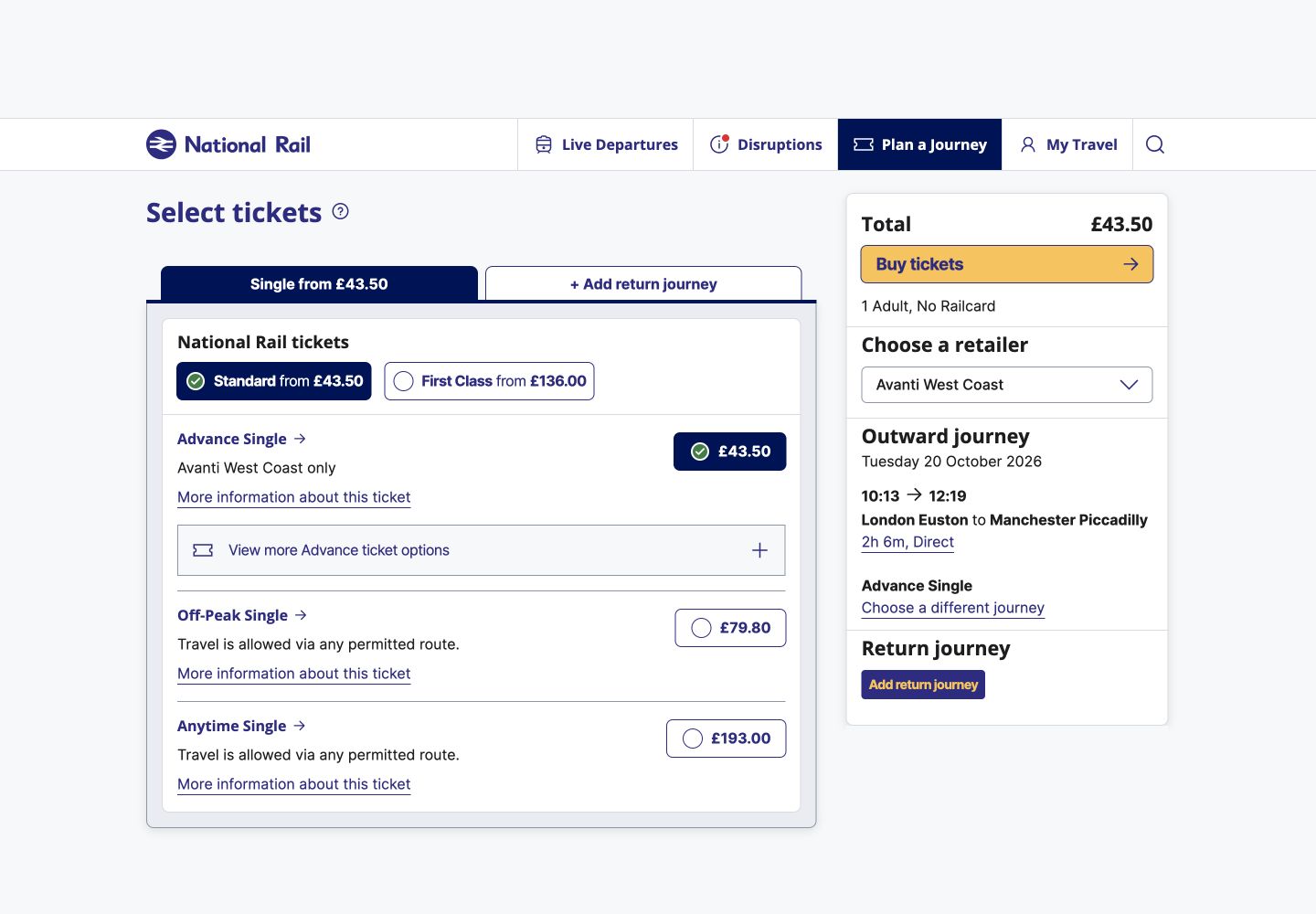
On the 10:13 direct service, National Rail offered three visibly different commitments: a £43.50 Advance Single restricted to Avanti West Coast, a £79.80 Off-Peak fare valid by any permitted route, and a £193 Anytime fare. The total remained £43.50 after the Advance selection. This turned ticket jargon into an understandable flexibility ladder before the customer left National Rail.
Trainline behaved differently. After we selected a visible £43.50 result, the recommendation panel presented the 10:46 one-change itinerary at £14 instead. It described the Advance Single as valid only on the specified train, using London Northwestern Railway, West Midlands Railway and Transport for Wales, and not refundable. The total was £14.79, adding £0.79 to the fare shown in results.
Round winner / National Rail
It held the chosen train steady and compared restricted, off-peak and fully flexible tickets before the handoff.
National Rail made the retailer boundary explicit
National Rail does not sell the ticket itself. After the fare choice it displayed 26 retailer options, including Avanti West Coast and Trainline. That extra decision adds a step, but it also makes the change of service visible before a customer enters another company’s checkout. We stopped there rather than opening a seller.
Trainline combined search, recommendation and sale in one service. That can be faster for a customer who accepts the recommendation, but the observed switch of itinerary and the £0.79 difference between fare and total deserve more prominent confirmation.
National Rail moved focus to a missing destination
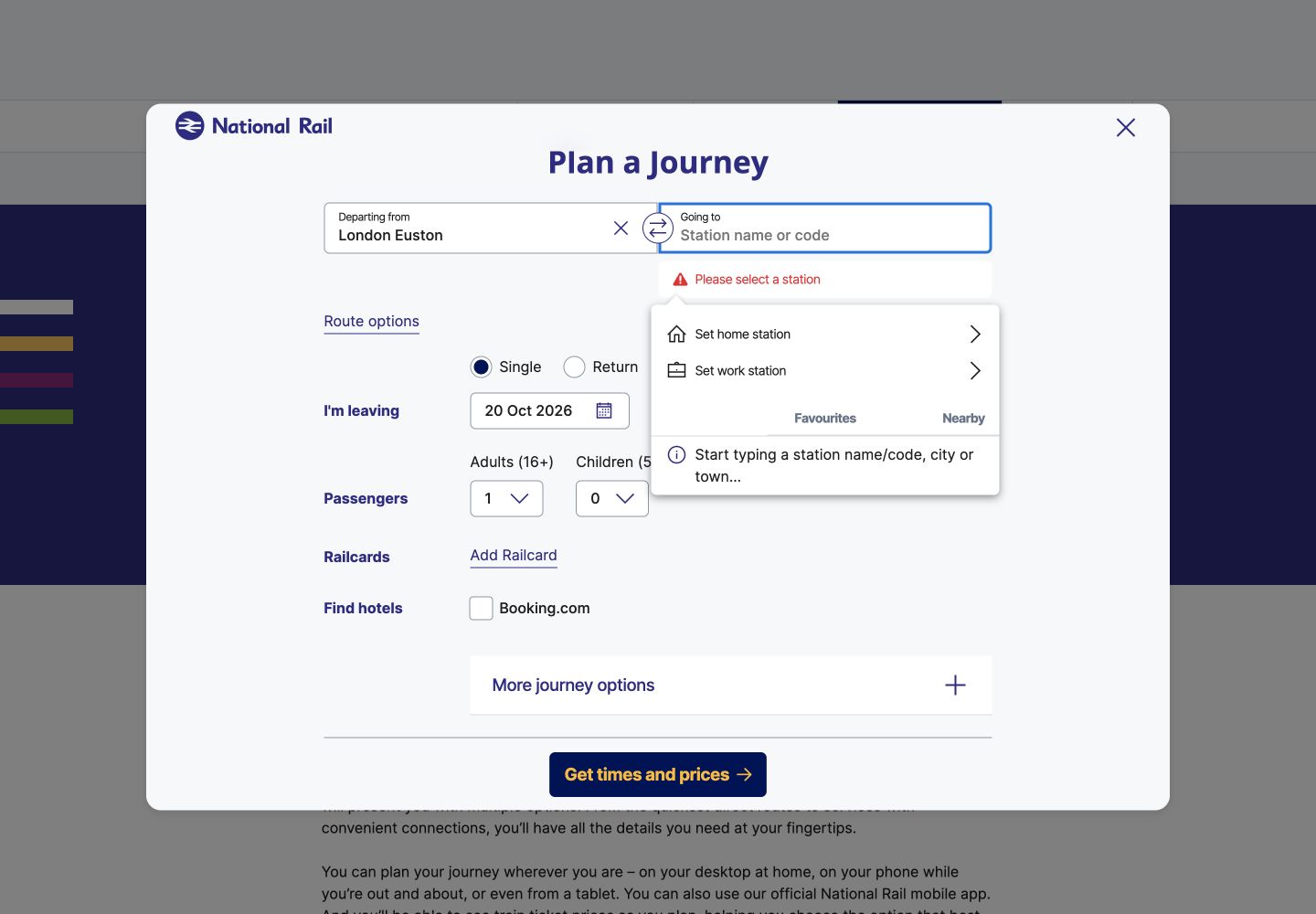
We cleared the destination and attempted to continue. National Rail announced “Please select a station” and moved keyboard focus to the “Going to” combobox. The entered origin and journey context remained available, and selecting Manchester Piccadilly restored the search. This was a concise, field-specific recovery path.
Trainline loaded faster; both interaction results need work
These are 75th-percentile Chrome UX Report results for the exact public URLs on phones, collected from 28 August to 24 September 2026. LCP is when the main content appears, INP is the delay after an interaction and CLS is unexpected movement. Trainline loaded within the good threshold and stayed stable, but its 478ms INP was poor. National Rail needed improvement for loading and stability, and its 755ms INP was poor. Desktop results were also stronger for Trainline: 1.59s LCP, 213ms INP and 0.02 CLS, compared with National Rail’s 3.65s, 509ms and 0.04.
The configured mobile PageSpeed runs scored Trainline 98 and National Rail 96 for accessibility. Trainline flagged heading order, a presentation-role conflict and visible-label/accessibility-name mismatches. National Rail flagged links distinguished by colour alone, plus console and inspector issues. National Rail fit the 500-pixel viewport without horizontal scrolling. Trainline’s page did not remain loaded during that responsive check, so no equivalent overflow claim is made. Automated results guide investigation; they do not prove accessibility or WCAG conformance.
What each website gets right
- Trainline: a lighter result presentation, strong loading stability and clear restrictions for the recommended Advance ticket.
- National Rail: faithful service selection, an understandable flexibility ladder, transparent retailer choice and excellent missing-field recovery.
All ten Nielsen usability heuristics
Keep the chosen train visibly selected.
National Rail did; Trainline’s recommendation changed the itinerary after selection.
Translate fares into freedom.
National Rail paired Advance, Off-Peak and Anytime labels with their route or operator conditions.
Separate alternatives from replacements.
A cheaper recommendation should not displace the customer’s chosen train without explicit consent.
Carry one fare into the total.
National Rail remained at £43.50; Trainline’s £14 result became £14.79.
Confirm route, time and operator together.
The final review should prevent a cheaper but materially different journey being bought accidentally.
Keep changes, duration and fare conditions in view.
National Rail’s comparison allowed the customer to review all three without remembering earlier cards.
Support fast and cheap paths without hiding either.
Both exposed the £14 connection and faster direct trains.
Keep recommendations secondary.
The selected itinerary, restrictions and total should dominate promotional alternatives.
Name and focus the missing station.
National Rail’s “Please select a station” response demonstrated the right pattern.
Explain retailer handoff and fees before leaving.
Customers need to know who will sell the ticket and whether the displayed fare will remain the total.
What we would change first
Never replace a selected train silently.
What
Keep the chosen £43.50 itinerary selected and present the £14 service as an optional, clearly labelled alternative.
Where
The transition from result selection to ticket summary.
Why
The observed summary showed a different departure, operators and number of changes.
Measure
Itinerary reversals, summary backtracks, wrong-train contacts and completed purchases.
Explain the £0.79 before the total changes.
What
Show the £0.79 difference and its explanation beside the fare in results or at the first selection state.
Where
Result cards and ticket summary.
Why
The visible £14 fare became £14.79 at the next decision point.
Measure
Price-breakdown opens, exits after total reveal and checkout progression.
Reduce interaction delay without weakening the fare comparison.
What
Profile route-planner and result components, reduce main-thread work and reserve result space.
Where
The planner modal, result list and ticket panels.
Why
Phone p75 INP was 755ms, LCP was 2.74s and CLS was 0.11.
Measure
p75 INP, LCP and CLS alongside successful searches and fare selections.
Resolve the named semantic defects and retest the task.
What
Fix heading, role, label/name and colour-only link problems; then verify keyboard and screen-reader behaviour.
Where
Journey forms, results and fare-selection controls.
Why
The lab runs identified specific component defects despite high aggregate scores.
Measure
Zero recurrence in automated component checks plus successful assistive-technology task completion.
What this public comparison cannot see
This was one route, time and passenger on one date. Dynamic fares may change. We did not hand off to a retailer, create an account, reserve a seat, enter passenger or payment details, buy a ticket, travel, amend or request a refund.
Public evidence cannot say which journey sells more tickets. With consented GA4 and Microsoft Clarity data, the next comparison would connect result sorting, itinerary replacement, fee disclosure, retailer choice and validation recovery to completed purchases and post-purchase contacts.